Search This Blog

Friday, 7 December 2012

Google Adsense Tuning And How To Place Ads Inside A WordPress Article

A few weeks ago I was invited by Google to a Google Adsense Special Event they were holding at the Google office in Boulder, Colorado. The event included some generic PowerPoint presentations and some solid advice. I was also matched up with a member of the Google Adsense team for a one on one review of my account and my main website. This one one one session was very interesting and since then I have been playing with different Google Adsense variations.
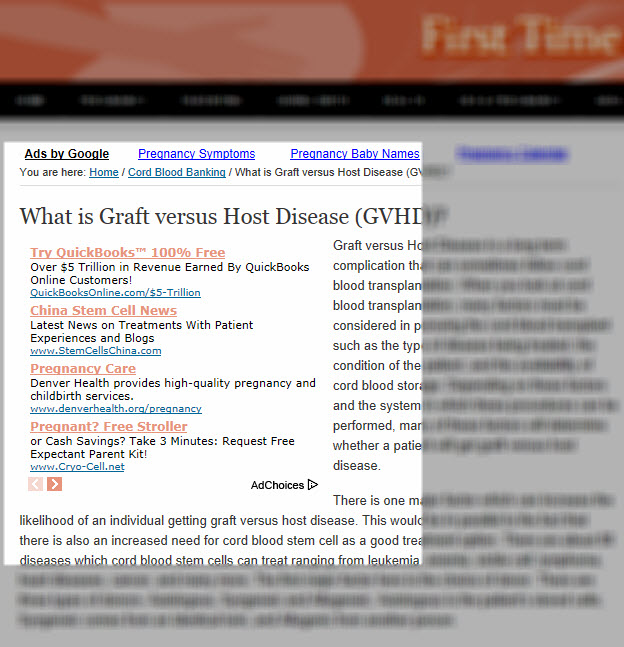
Google Adsense WordPress

I can taell you that there are many ways to reduce your income from Google Adsense. It is amazing how much a small change can make Google Adsense ads less performing. Of course there are plenty of options how things can work the opposite direction as well. But it requires a lot of testing and it requires some balls to mess around with one of your top performing websites. You probably should not care about reduced income if you make only a few dollars per month, but if your Google Adsense income is significant a small change can mean a lot less coin being transferred your way with the next payment. Definitely make sure you play with different ad sizes and color variations and give each ad enough time to collect data so that you can make an informed decision.
While split testing the different ads it is also important how to position your ads on your website. The best performing ad position for me is above the article, but below the headline of that article. However, this is bad for the user experience in my opinion. It can actually happen that the user will never see the article they came for in the first place if they find an ad appealing and click on it. While that is great from a revenue perspective, it can have a big negative impact on your search engine rankings and you can jeopardize your good ranking for some short revenue. The Google Adsense team will tell you one thing, while the Google Search team will tell you otherwise. It is up to you to really find the thin line in the middle. In addition, I prefer to have visitors on my websites a little longer and not to lose them right away.
One way to compromise is to place the Google Adsense ads at the top of the article, but to let the text flow around the ads. It is not as intrusive compared to just placing the ads above the article. Overall it makes the pages look nicer, too. The user experience is better and in the end that is an important piece for me (and your search engine rankings). In addition to have the text flow around the Google ads I am also making sure that on my WordPress based websites the ads are only shown on the specific article pages and not on the home page. Here is a piece of code that you can use to accomplish just that. Just paste it into the location that represents the place where you want to display the Google ads. The screenshot above gives you a good view at how this will look like production.
 <div style=”float: left; margin: 5pt”><?php if(is_single()) { ?>Your Adsense Code Goes Here<?php } ?> </div>
By the way – the color combination for the ad block that you did not perform very well for me. I am using an Excel Spreadsheet to keep track of when I made changes to a specific ad and ad channel and then how the specific ad worked out in production. This testing process is called split testing and if you are trying to sell online should be something you do all the time.
I use the Genesis Framework (Studiopress) on most of my websites because it is SEO optimized right out of the box and it allows easy changes to WordPress through hooks. There are even some Genesis related WordPress plugins available so that you do not need any coding knowledge to customize your blog. I’ll put the code from above into the following Genesis Hook
genesis_before_post_content
Very easy to do split testing this way. One single change updates the Google Adsense ads on all your postings.
Disclaimer: Please note that the link to Studiopress is a so-called affiliate link and the fine folks of the FTC require me to disclose the fact that if you would buy Studiopress through this link that I will earn a small commission in return. I use StudioPress on many websites, as a matter of fact this very website here is using Studiopress. You can see that these are beautiful WordPress themes. I think it would be great option for your blog as well. Thank you for your understanding.

How to Insert Google AdSense Advertisements into Blogger Put Ads into Your Blog to Earn Money

How to Insert Google AdSense Advertisements into Your Blog on Blogger

by Christopher Heng, thesitewizard.com
Following my article on How to Add Google Advertisements (Google AdSense) to Your Blog or Website, I received queries from a few visitors on how they can integrate the AdSense ads into their blogs. This tutorial deals with the procedure for blogs hosted on Blogger.

Assumptions Made in This Article

  1. I will assume here that you already have a blog hosted on Blogger. For those who don't know, Blogger is one of the many free blogging web hosts around.
  2. Another assumption that I will make here is that you already have an AdSense account. If not, read my general article on How to Add Google Advertisements to Your Blog or Website first. You may also want to read the article How to Make Money From Your Website to get a general idea of the different ways of earning money through advertising on your website. Or, if you're already an old-hand at such things, just sign up.

Steps to Enabling AdSense Ads on Your Blogger Blog

  1. Log into your Blogger account.
  2. Click the "Layout" link under your blog name on the Dashboard. If you don't have such a link, go to your Templates page for your blog and click the "AdSense" tab.
  3. If you have clicked the "Layout" link earlier, you will now be given a choice of where to place your advertisments. For example, if you want to put your ad in the side column click the "Add a Page Element" link in that column. If you want it at the bottom of the page, click the similarly named link at the bottom.
    A new window will open, allowing you to choose the type of page element you want to add. Click the checkbox beside "AdSense". You will be brought to yet another page when you do that. Look for the "Sign in" link and click it. Enter your AdSense login and password to log into your AdSense account.
    Note: Those who had to click an "AdSense" tab in the first step will not have the choice of choosing where to place your advertisements. If that's the case for you, just skip to the next step.
  4. Once you have signed in, you will be brought to a screen that allows you to choose the size and colour scheme of your advertisements. A preview window underneath your selection shows you what your advert will look like.
  5. When you're done, click the "Save changes" button.
That's it. When you next check out your blog, you should be able to see your advertisements.
Copyright © 2008 by Christopher Heng. All rights reserved.
Get more free tips and articles like this, on web design, promotion, revenue and scripting, from http://www.thesitewizard.com/.

How to Make Money with Google Adsense


Google Adsense is one of the best ways to make money from your site. You might not become a millionaire with your Adsense monetized properties but with some luck, and above all knowledge about what works with Adsense sites and what doesn't, this could become a stable source of income for you.

How Much Can I Make With Google Adsense?

This is a question almost everybody asks before jumping on the Adsense wagon. There isn't a universal answer – some Web masters are making a fulltime income from a single Adsense site, while others with 5 or more sites can't even cover their hosting fees.
How much you will make with Google Adsense depends on many factors. Some of them are outside your control - i.e. the overall state of the economy or what advertisers Google has managed to attract. However, there are also many factors within your control. For instance, obviously, if you have one site with 10 pages only you will make thousands of times less than if you have 10 sites with thousands of pages. Basically, all equal, the more content you have, the more you will make.

1 Choose a Profitable Niche

However, in addition to sheer volume, there is one more very important consideration – what your site is about, or to put it more professionally, which niche your site is in. Different niches aren't equal – there are more and less profitable ones. There are niches, such as health or finance, where high value clicks are common and niches, such as culture or history, where you can make almost nothing with Adsense.
This is why you need to choose a niche where clicks pay well. It is true that good niches are very, very competitive but even in the most competitive niche, there is always place for one more good site. After you choose the niche, you need to find the high volume keywords in it and optimize your site for them. To search for keywords with high search volume, use the AdWords tool.

2 Place the Ads in Visible Places

Strategic placement of the ad units is vital for your profits. Quite logically, when you place ads where they are visible, this seriously increases the number of clicks you will get. The best places are above the fold (i.e. in the top half of the page) and in the text itself. Basically, the closer the ads to the text are, the better. You can have a look at these AdSense placement tips from Google to see which places are considered good, best, and worst for ad placement.

3 Optimize the Ads for Higher CTR

Strategic placement is important but there are other aspects you need to take into account when you optimize your pages for high CTR (Click Thru Rate). Here are some more tips how to fine-tune your ad units in order to attract more clicks:

Choose the right ad size

Adsense offers numerous sizes in the form of rectangles, squares, buttons, and bars but the truth is that only some of them convert well. Generally the sizes Google recommends are 300 x 250, 338 x 280, 728 x 90, 160 x 600, and 320 x 50 (for mobile banners). The first two are suitable for intext use, the third is suitable to put under the site header, and the 160 x 60 one works best under the menu, if you use left/right menu navigation. Of course, you can also experiment with the other available sizes and see if they work better for you.

Choose multiple ad units

You are allowed to run up to 3 ad units, 3 link units, and 2 search boxes per page. This means for ad units and link units you need to choose multiple units, preferably in different sizes. For instance, you can choose one 728 x 90 or 160 x 600 unit for under the header/the side menu and two more, i.e. 300 x 250 and 338 x 280 for inside the text. As for the type of ads, the choice is between text, text and image, and image only ads. Usually plain text ads work better because images are too obtrusive to attract clicks but you should try for yourself and see what makes you more clicks.

Use link units

A common mistake many people make is not to use link units. Link units can outperform normal ads because they are less obtrusive and if you blend them with your menu, people will click there. You can put one 728 x 15 link unit under the header and one 160 x 90 under the side menu. You can make the link color the same as the color of the items in menu but don't use the same font type and font size because this could be considered a form of format mimicking and could get you penalized.

Choose the right color

Link units aren't the only ones that can benefit from the right color. However, with them it is easier – just use the same colors as you do in the menu and you are done. With normal ad units, this isn't that straightforward. Basically, the options here are to blend the unit (i.e. make the links and text in the same color and size as your text), use a contrast scheme (i.e. if your site is in green, use red for the ads) so that the ads stand out from the rest, or stick with Google default. Which one is best? Nobody knows! What works for one site (i.e. blending) will not work for another. So the only thing you can do here is to use the trial and error approach and see which of the three works for you. Or, if you want a more scientific approach, try AB tests.

AB test multiple sizes and color themes

AB tests sound very complex but in reality their concept is brilliantly simple. The idea is that you test which of two similar units performs better. For the purpose, you test 2 similar units (i.e. two 338 x 280 ads) that have one differing feature (i.e. font color). Both units must be placed on the same spot. On every even page visit you serve unit number 1 and on every odd page visit you serve unit number 2. Go to your Adsense account, create the two units, create a separate channel for each of them (don't forget this because if you do, you won't be able to perform the test), and put the following code:
<script type="text/javascript">
var random = Math.random();
if (random < 0.5) {
<!-- put Adsense Block A here --> }
else
{
<!-- put Adsense Block B here --> }
</script>
<script type="text/javascript"

src="http://pagead2.googlesyndication.com/pagead/show_ads.js"></script>Run the test for a month or so and track which unit attracts more clicks. Of course, you can never be sure the difference in clicks is due solely to the difference between the two units because random factors always kick in but if it is quite a difference, then you know which way to go.

4 Drive Traffic to Your Site

Finally, one really important prerequisite for making money with Adsense is traffic. You might have an incredibly high CTR but if you don't manage to drive traffic to your site, you won't be making money.
The most important free traffic source are search engines. Traffic from search engines is targeted and as a rule it converts well. Our site offers quite a lot of resources about how to make your site rank well with search engines, so take the time to browse it and get familiar with SEO. If you have absolutely no idea about SEO, you might want to start with the 15 Minute SEO guide, or read the SEO tutorial.
Traffic from search engines converts best but you should never allow yourself to be dependent on it. Google Panda update was one of the most bitter lessons for many webmasters, when their sites dropped in rankings and their traffic hit bottom. You shouldn't neglect traffic from other sources, such as social bookmarking sites, Twitter, Facebook, and any other free traffic.

5 Google Adsense Alternatives

If you do everything properly but you don't see much in your Adsense account, don't get desperate. The reasons for poor Adsense income can be numerous. Try to find them and correct the issues (i.e. wrong niche, bad placement of ads, inadequate ad sizes, types, and colors, etc.) If this doesn't help, consider the numerous Google Adsense alternatives. In general, they bring less revenue than Adsense but who knows, for your site it might be just the opposite. Just keep on trying and sooner or later you will make it! 

YouTube Promoted Videos Will Appear in Google's AdSense

What is Google AdSense?

Google AdSense is possibly the largest affiliate marketing program on the web. Basically, when you enable it on your site it shows text link ads along the side of your site, similar to the sponsored listings that appear on Google itself. Google is smart about which ads it shows by understanding the content of your site. Google chooses the ads that appear so that they are relevant to the theme of your site. For the advertiser it's a winning situation because their ads appear on relevant sites that provide targeted viewed and potential clicks. For those running the ads it's a nice source of additional funds. There many marketers that focus on building popular content rich sites or blogs that depend on AdSense for their incomes.

What are YouTube Promoted Videos?

Back in 2006 Google bought YouTube.com for $1.65 billion and have ever since tried to make it turn a profit. One method they are using to try to achieve this is YouTube Promoted Videos, which are videos that show along the right side that are sponsored. The paid videos work the same way as Google ads. The advertiser chooses which terms they wish to target and their video only shows when those keywords are searched as they only pay for the cost of the based on the number of times people actually watch their video.

Google AdSense + YouTube Promoted Videos = ?

So now mixing these two concepts means something pretty cool. Now video ads could appear on your site if you are running Google AdSense. YouTube promoted videos include a thumbnail image with 3 lines of text, and when clicked, they take the user to a video or a channel on YouTube, so full-sized YouTube videos will not appear in AdSense ad spots on publisher sites. The formats will be:
  • 300x250 Medium Rectangle
  • 336x280 Large Rectangle
  • 728x90 Leaderboard
  • 250x250 Square
  • 200x200 Small Square
Currently, the program is only running on English US sites but probably soon will be offered on international sites as well. For those running Google AdSense this could mean increased click-thrus and make their content appear more attractive to viewers because it will appear more interactive. I personally found video ads more alluring to click and I imagine a video would receive more clicks than a regular text ad. Ultimately, its welcomed news for all Google Adsense publishers.

source:  http://www.allanpollett.com/YouTube-Promoted-Videos.html

High Paying Adsense Keywords

Finding the high paying Adsense keywords is basic for anybody attempting online marketing. That is because back you accept these words, you will make a much more money online. Google AdWords and Google AdSense accept fabricated it alike easier to accomplish an assets on the Internet. These keywords are absolutely important to your website, abnormally if you are autograph your own agreeable for that site. The words you use are what will draw cartage to your website.

Some keywords will accompany a lot of money from the advertisers. The account of these keywords chronicle to specific industries such as allowance and law. These top advantageous Adsense keywords are apparently so accepted due to the bulk of antagonism in these groups. It may additionally be due to the aerial accumulation apparent in these areas.

Keywords that are frequently acclimated are “Chicago claimed abrasion lawyer.” These words accept aerial advantageous advertisements on Google. Added than these keywords, it’s important to accept that Chicago attorneys are not the alone ones advertising. Attorneys in added states and cities are accomplishing it as well.

The added keywords that get a lot of absorption are the ones acclimated by allowance companies. A lot of allowance companies pay aerial amounts of money for their advertising. These are some of the top advantageous Adsense keywords and, therefore, the ones that accord you the best adventitious of authoritative money from them. These keywords pay from $10 to $30 per click.

If these are the keywords you are application in your articles, you can calculation on authoritative appropriate money from any accessories pertaining to them. Just get lots of cartage visiting your armpit and address accessories that attract them to bang on those aerial advantageous ads. Keeping new agreeable actualization consistently on your armpit will additionally go a continued way to accepting echo visitors.

source:  http://googleadsensearticle.blogspot.com/2012/01/high-paying-adsense-keywords.html

Google Adsense Important to Get Approved

Google Adsense Why it is Important to Get Approved for the Program and the Advantages of Not Getting Your Own Blog Site

Why Do I Have to Get Approved for the Google Adsense Program

It’s not really about you.  Google has standards to which they adhere and there are certain sites that they don’t want their advertiser’s ads on.  Check the Program Policies for an exhaustive list of what kind of content sites are not acceptable.  For the most part, they do not allow ads to be placed on any site that has excessive profanity.  This is probably the hardest one to decipher as the word “excessive” could mean one thing to a publisher and another thing altogether to the Google Adsense program.  To be on the safe side, if you notice more than a couple instances of profanity on a site you are considering using for the Google Adsense program, you might want to consider another site.

Sites that contain ads for beer, liquor or tobacco products are not allowed to participate in the Google Adsense program.

Sites that promote hate or racist attitudes are not allowed to participate in the Google Adsense program.

If the site you are considering promotes gambling, drugs, even prescription drugs then it is not suitable for the Google Adsense program.

A good guideline to go by might be if a site is family oriented. That may not cover everything but it’s a starting place.  Again, check the Program Policies for more information.

Why Your Should Not Pay for Your Own Blog Site

If you already have a website that showcases your wares or you’ve been thinking about getting one, that’s great.  Since you’re working on building a business anyway, you can only profit more by implementing Google Adsense on your site.  As long as it conforms to Google Adsense Program Policies of course.

If, however, blogging is your interest, I say stick with the most popular blogging site you know.  Or even two or three of them.  Why?  Traffic.  Lots of it.  Blogging on an already populated site versus dreaming up your own blog site is like the difference between 5:00 traffic in New York City and an old dusty country road.  Not only do the owners of writingup.com, bloggerparty.com and others like it bring in the traffic, they even help you make money when you bring in more traffic.

 source: http://googleadsensearticle.blogspot.com/2012/02/google-adsense-important-to-get.html

Why Long Articles Important to increase Google Adsense Revenue?

Are you complaining about low adsense earning and CPC even when your blog is having good traffic?, read this small guide. Earlier I published an article on how to increase the adsense CPC, but here is one more important factor you must consider to increase the earning.
The post content size is very important to get relevant and high quality adsense ads. We must understand that our readers will click on ads which are related to the article and information they are looking for. For example if your article is discussing about ‘money management’, then your readers do not want to see ‘wordpress webhosting’ adsense ads inside the content. But, sometimes Google shows these types of ads too even though they are the best ad serving company. That is not the problem with Google, it can be an issue with your content.
picture
Normally, when your post page loads with adsense ad codes, adsense robots scan the content (matching the keywords in their system) and show the relevant ads. Therefore, if your article is not having enough words (useful keywords) to feed the adsense robots, then surely its going to show some non relevant ads.
Few things can happen when Adsense robots struggle to find enough content.
1) Display non relevant ads.
2) Display public ads ( Any clicks on these ads will not generate income to you)
3) Sometimes blank space too.

OK, let me explain with a small example.
Lets assume you have inserted three adsense ad blocks with the size of 336×286 (with only text ads) in your each post/pages. Most of the time, each 336×286 ad will try to display 4 ads ( normally when text ads are enabled).
So, in this case 12 text ads should appear and you are hoping these ads should be relevant and high CPC!!.  Now, look at your article size, is that enough to feed adsense robots to fetch 12 relevant ads? Think about that.
Even writing 200 to 300 words article will not be enough in this example. Importantly, adsense is looking for keywords which advertisers are targeting not just any words.
For example,
“ I like to complete my college studies, so I can get a good job to earn money and study more’
The above sentence may not fetch quality ads, since it is not having high value keywords (where most of the advertisers will be competing).
Try this sentence,
“I like to complete my engineering college studies which I’m doing at one of the top college in London. So, I can get high salary engineering job and study advanced PhD in Air craft engineering.”
(This is just an example, do not find any mistakes Smile )

You can see the second sentence which says the same thing, but with different keywords. I have mentioned the keywords in bold letters and possibly advertisers will be advertising their products (college, courses..etc.) on them. The second sentence is slightly longer then first one and definitely it will get more quality Google adsense ads.
Check my earlier guide on how to find high paying keywords for adsense.
Remember, you DO NOT need to write your each sentence and paragraphs like this considering high paying keywords. Then it will end up as ‘Keyword stuffing’ and your normal readers will be irritated to read these type of sentences everywhere in the article. So, you have to balance everything, including,
1) Normal human readers.
2) The keyword you are targeting to get search engine traffic ( SEO keyword)
3) The keywords you are targeting to get high paying (CPC) adsense ads.

So, finally when you consider above there points in your article and balance each properly without alarming human readers, SEO robots and adsense robots, then definitely your article will be more than 500 to 600 words.

I hope this small article makes sense to get some ideas on getting relevant and high paying adsense ads to increase the revenue. I shared here what I follow most of the time and quite succeeded too.
After Google started to consider ‘best user experience’ in each blog pages, you have to make sure you are not over doing anything extra which will put you in trouble.
Balance everything and make good money!
Good luck.

source: http://www.dailyblogmoney.com/why-long-articles-important-to-increase-google-adsense-revenue